Setting a Cloudflare Page Rule to redirect users
When moving your content to a new system, it’s ideal to keep things working as close to as they used to as they can. That way, any links posted to your old content will still direct visitors to the same stuff on your new website.
An issue that can crop up is when your different content management systems have different ways of storing posts. For instance, for an old post, the way the Jekyll template was configured was using directory paths that looked like:
http://www.tteoh.com/veterinary/2016/01/20/microchips-authorised-implanter/
Under the new system, however, the address of this post looks like:
https://tteoh.com/post/2016-01-20-microchips-authorised-implanter/
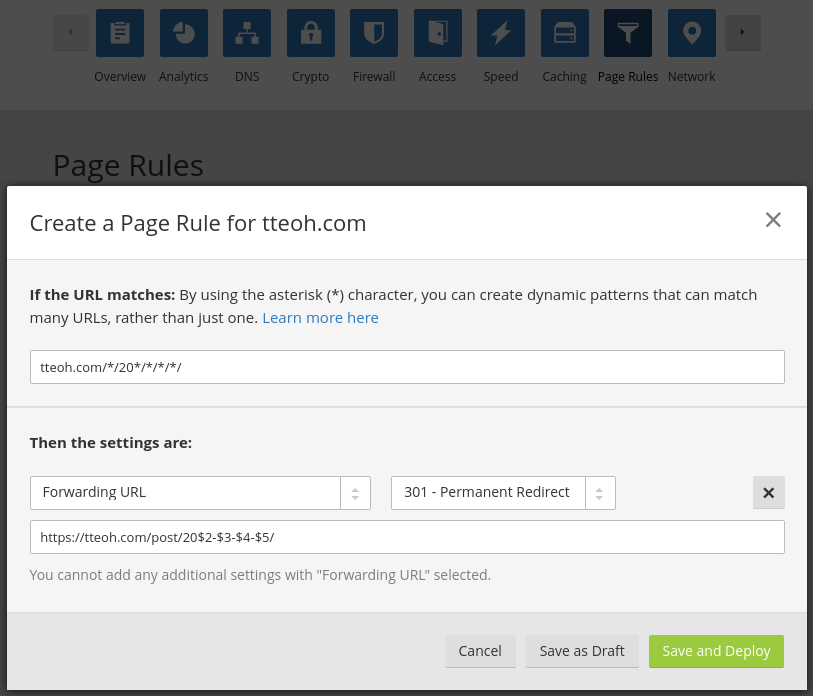
It is possible to use page rules to take the information given by the old address and automatically redirect users to the new content. If you use Cloudflare for your DNS, it is reasonably easy to do via the control panel.
When a user attempts to visit a page that matches your page rule, you can set it to trigger a response. In this case, page rules can forward users to the correct page.
To do this, compare the web addresses to see what can be reused in your corrected link:
Old: http://www.tteoh.com/veterinary/2016/01/20/microchips-authorised-implanter/
New:        https://tteoh.com/post/2016-01-20-microchips-authorised-implanter/
Using wildcards, we can match the addresses of interest to catch not only one post but all posts. An asterisk (*) can be used for this.
tteoh.com/*/20*/*/*/*/
We can retrieve the information matched using our asterisks using $1 for the first match, $2 for the second match and so forth. In this case, we want to use information covered by asterisks 2, 3, 4, and 5, while updating the scheme and discarding the old metadata:
https://tteoh.com/post/20$2-$3-$4-$5/
Set it as a permanent redirect (301) and you’re done.