Repurposing a USB display, one byte at a time
A 3.5" USB-C display came my way recently, surplus from someone who had no use for it. It arrived with a single printed page of instructions and following them led to a Google Drive folder containing a Windows driver and a set of pre-baked configurations. Plug it in, run the vendor software, and watch a handful of system stats scroll past.
I did not want to run their software, and I did not want a single-purpose monitor. What I wanted was a small screen I could drive from a Raspberry Pi for my projects: sensor readouts, system status and other information that I needed to keep an eye on. I really needed this to function outside of what it had been shipped with.
Reverse-engineering a USB peripheral with no documentation is not something I would have known how to start. In the past this is exactly the sort of project that I would have approached in one of two ways: finding someone online who had done something vaguely similar and fiddling with their settings until something worked, or giving up. This time, with the help of LLMs, I had the opportunity to build and test something that specifically addressed this device
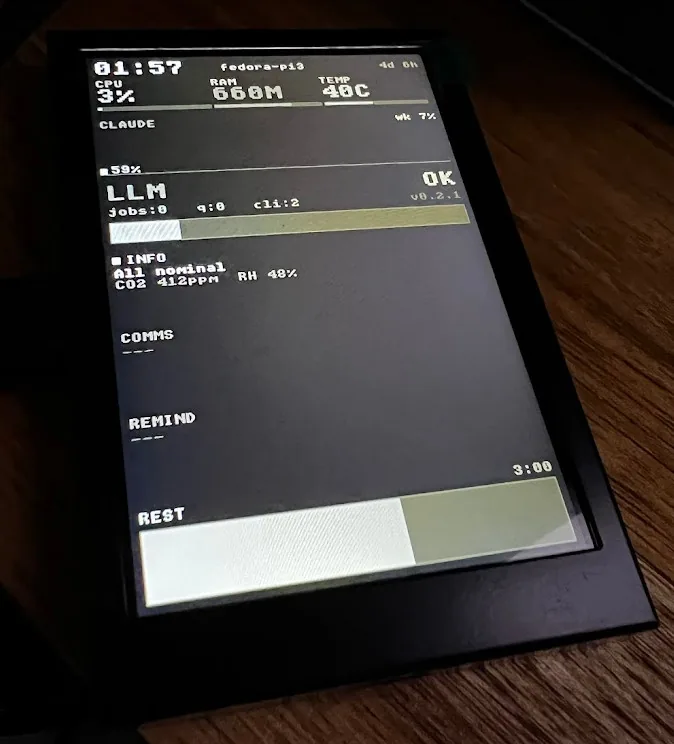
What we were actually holding
The display enumerated as UsbMonitor with USB vendor and product IDs 0x1A86:0x5722 and the vendor bundle contained UsbPCMonitor.exe and a UsbPCDisplay.dll. The goal from the start was to make it work on Linux without writing a kernel driver.
Plugged into the Pi, the kernel’s cdc_acm module bound to the device and handed over /dev/ttyACM0. So the hardware presented a standard USB serial port. Unfortunately, the kernel had no idea what to draw on the screen. No framebuffer device, no DRM connector, no input node. What we had was a working serial port and an unknown binary protocol on the other end of it. It was purely a question of what bytes to send down the serial port to make pixels appear.
Reading the vendor binaries
The obvious first move was to read the software that already worked. If the Windows tool knew the protocol, the protocol was in the Windows tool somewhere.
UsbPCMonitor.exe turned out to be a .NET 4.5 PE32 executable. .NET assemblies carry a lot of metadata, and monodis (the Mono disassembler) will happily dump it: method names, field names, string literals, type tables. That gave a useful vocabulary even before any actual logic was visible:
sendCMD
RectangleSendCMD
KdSendCMDRectangle
CurveLineSendCMD
WriteToSerialPort
ReadFromSerialPort
Field names told their own story too: FrameLength, DestBuffer, and a fist_send_state (the typo is in the original, faithfully preserved). Taken together this confirmed several things about the design; that it used double-buffered rendering, it had a widget system and that it was driven by commands rather than by dumping a raw framebuffer.
What the metadata did not give was byte values. The IL method bodies were unreadable: the RVA offsets in the MethodDef table did not map to valid positions in the file. So we had the names of the methods but not a single line of their code.
UsbPCDisplay.dll was worse. It is a native C++ DLL, compressed with UPX using the NRV2E algorithm. monodis segfaulted trying to read it. Decompressing it would have meant installing UPX (not present on the Pi) and then reading stripped C++ with no debug symbols, which is a far harder target than IL.
A problem already solved
It turns out someone had already done the hard part.
A search surfaced mathoudebine/turing-smart-screen-python, a GPL-3.0 project documenting the exact same 0x1A86:0x5722 device. It laid out the whole protocol: the 6-byte command packet structure, the HELLO handshake, the DISPLAY_BITMAP sequence, an RGB565 little-endian pixel format, and the serial parameters (115200 baud, RTS/CTS flow control).
Every detail inferred from the vendor binary matched what that project documented, which was good validation that we were looking at something that we could directly base our work on and save what would otherwise have been weeks of USB packet sniffing.
A Python prototype first
With the protocol in hand, the first build was in Python: pyserial for the link, Pillow and numpy for pixels. Open the port, send HELLO, read the reply. The display answered with six 0x01 bytes, which the protocol documentation decoded as: model UsbPCMonitor, 3.5", native resolution 320×480, portrait orientation.
The prototype grew into a small toolkit:
usb_monitor.py, the core driver libraryprobe.py, a hardware test: colour bars, brightness cycling, text renderingsysmon.py, a live system dashboard (CPU, RAM, temperature, disk, network)display_image.py, to show an arbitrary image, scaled to fit
At this point the device was functional at a basic level.
What a second pass found
Coming back to the Python code for a careful review turned up several bugs, some of which had been quietly producing wrong behaviour rather than obvious failures. The quiet ones are always the interesting ones.
The chunk_size used to break pixel data into bursts was computed from the effective (post-rotation) width rather than the native width. In landscape this produced wrongly-sized bursts that the display silently misinterpreted instead of rejecting.
The landscape sysmon layout overflowed the screen, drawing text and bars outside the visible area, because the layout maths had never been recomputed for the rotated canvas dimensions.
HELLO had no retry. If the display was not ready the instant the port opened, the driver carried on regardless, with no detected panel and no error.
The most consequential bug was in SET_ORIENTATION. The packet was sending the rotated dimensions in bytes 7 through 10, when the firmware expects the native width and height unconditionally and performs the rotation itself. Feeding it rotated dimensions corrupted the display state in a way that only showed up on certain orientation transitions, which made it genuinely hard to pin down.
One design choice held up well under review. The Python sysmon updated individual screen regions rather than redrawing whole frames, and that was correct by necessity rather than luck. A full frame over this link takes around five seconds. Region updates are the only thing that keeps a dashboard usable. More on why below.
Rewriting in C
The Python driver worked, but it carried interpreter startup overhead and had no good path to SIMD pixel encoding. Three reasons drove a rewrite in C:
- NEON SIMD for the RGB888 to RGB565 conversion: eight pixels per cycle on aarch64, roughly six times faster than scalar C.
- No interpreter overhead, so the process starts in milliseconds rather than waiting on a Python runtime.
- A clean abstract backend interface that could support both the
termiospath (viacdc_acmand/dev/ttyACM0) and alibusbpath that bypasses the kernel driver entirely.
The C version also fixed every bug the Python review had surfaced: native dimensions in SET_ORIENTATION, native width for chunk_size, a HELLO retry, and a landscape layout that actually fits.
The project name is based on the CH340 USB-to-UART bridge chip inside the display, and it hopefully is applicable to other implementations of this configuration.
How it fits together
flowchart TD
    A["Vendor DLL, no docs"] --> B["Extract .NET metadata"]
    B --> C["Method names only, no IL"]
    C --> D{"Protocol recoverable?"}
    D -->|no| E["Search for prior work"]
    E --> F["GPL project with the protocol"]
    F --> G["Python prototype"]
    G --> H["Second pass: fix framing"]
    H --> I["Rewrite in C"]
    I --> J["Driver on the Pi"]
The architecture designates the backend as an abstract interface, a struct of function pointers in backend.h with open, close, write, and read. The protocol layer calls through those without knowing whether it is talking to a termios file descriptor or a libusb device handle. The same command encoding, HELLO logic, and pixel streaming run unchanged over both transports.
The canvas (canvas.c) is a flat RGB888 buffer with a few 2D primitives: rectangles, horizontal and vertical bars, and text drawn from an embedded 8×8 bitmap font. Embedding the font means no FreeType dependency and a fully self-contained binary, which matters on a small device where you would rather not drag in a font-rendering stack to draw a label.
The libusb backend claims Interface 1 directly (bulk OUT 0x02, bulk IN 0x82). It earns its place when cdc_acm is not loaded, or when something needs debugging at the level of individual USB transfers.
The number that does not move
Although we did make some progress in efficiency by moving to C, it’s worth noting that we’re bottlenecked by the hardware itself. The CH340 UART runs at 115200 baud with 10-bit framing (8N1, a start and stop bit per byte), which delivers 11,520 bytes per second. A full 320×480 RGB565 frame is 307,200 bytes. Naively that is 26.7 seconds; protocol overhead amortises oddly and the measured end-to-end figure is around 5.4 seconds per frame. Even if the NEON encoder runs at about 1185 MB/s on a Pi 3, encoding a full 320×480 frame in roughly 0.4 ms, we still get an appreciable refresh latency.
To partially accommodate the physical baud-rate limit on the bridge chip, partial region updates, which is what the Python sysmon was already doing out of necessity, or negotiating a higher baud rate, which is undocumented and probably not supported by this firmware were our options. The project ships bench and bench-encode commands precisely so anyone can reproduce these numbers on their own hardware.
Making something from nothing
This project was a great opportunity to take something that otherwise would have been relegated to the scrap heap and customising it to suit my specific needs. No longer are we limited in relying on a vendor’s Windows tool or pre-baked limitations. Instead it is something that is genuinely useful (for me), that will synergise well with my future projects.
None of this required me to already know how to reverse-engineer a USB peripheral. The capability to attempt it, follow the dead ends, recognise the breakthrough when a prior project handed us the protocol, and rebuild cleanly in C (and do so doggedly while trying any number of different approaches) really opens up possibilities. I’m optimistic about the next items on my backlog.